Over the past few days, an intriguing and entirely legitimate subscription hack has taken Chinese developer communities on Bilibili and Linux.do by storm. By combining a Turkish-region Apple ID with the in-app purchase upgrade flow inside the native iOS Google Search app, Google's top-tier Google AI Ultra 20X subscription—which retails for a steep 199.99 USD per month (roughly 1,340 RMB)—can currently be unlocked for just 2,949.99 Turkish lira (TRY). At prevailing exchange rates, that works out to between 394 and 410 RMB (about 56 to 58 USD).
After thoroughly reviewing the hands-on video walkthrough by Bilibili creator "AI塑造未来" (AI Shaping the Future), field-testing threads by Linux.do community members, and dozens of comment-section troubleshooting reports, the underlying mechanics become clear. The most valuable aspect of this path is that it settles cleanly through Apple's official App Store in-app purchase infrastructure. However, the onboarding funnel is intentionally buried, and the subscription sheet is littered with deceptively similar options. Below is an unvarnished breakdown of operational constraints, real model quota limits, and practical spending advice.
1. Unlocking 20X Flagship Model Quotas for 400 RMB
A 70% Discount on Google's Top AI Tier
Anyone who uses Google Antigravity to write production code or run heavy autonomous agent workflows knows that Google tiers its AI subscriptions across several distinct levels. Most individual developers settle for the 5X tier, which costs around 280 RMB in Turkey. The flagship Google AI Ultra 20X plan, however, commands a monthly price of roughly 1,340 RMB (199.99 USD) in the US region—a rate that is difficult for independent developers to justify on an ongoing basis.
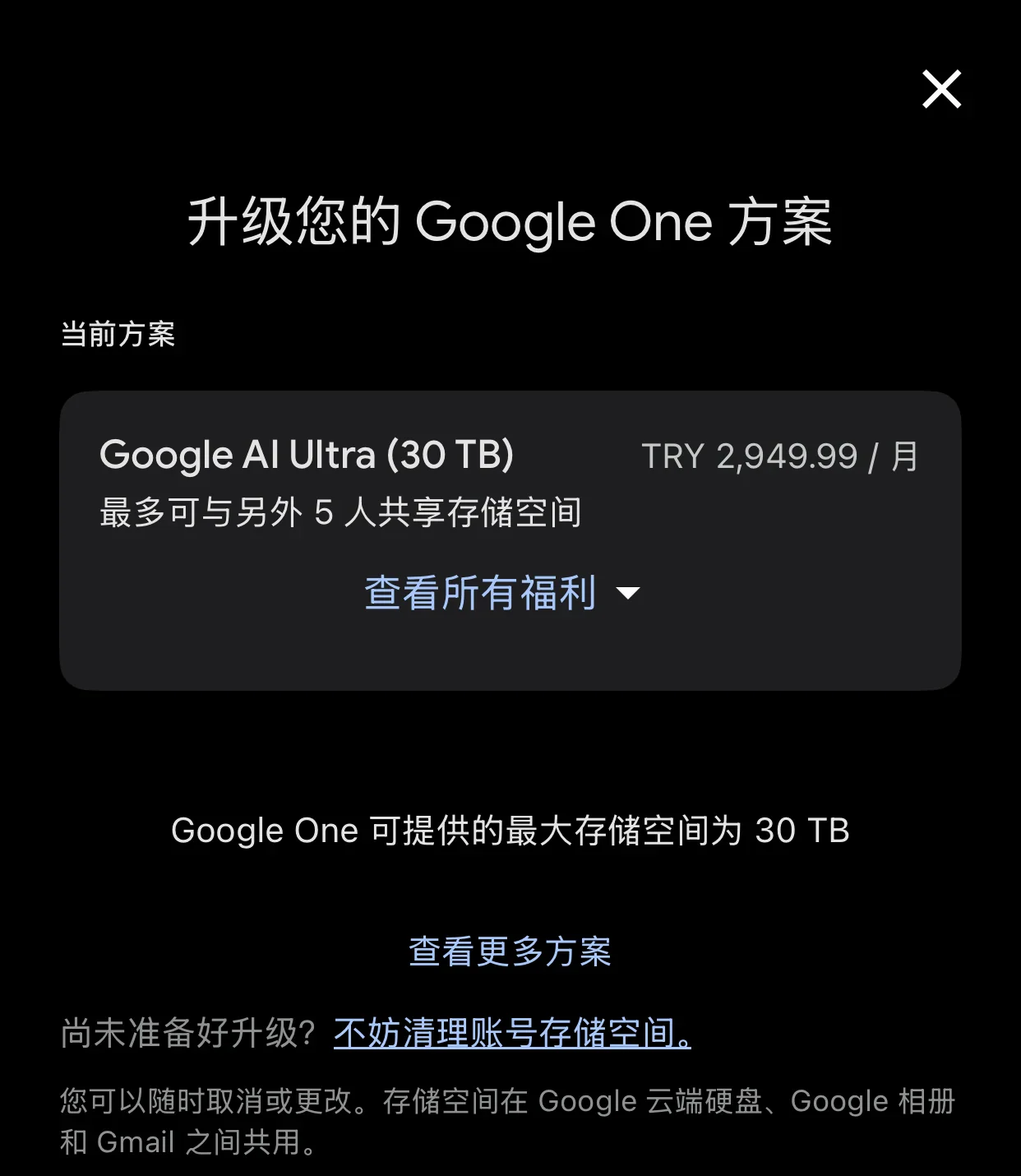
The Turkish iOS in-app route essentially slashes that flagship subscription down by 70 percent. For just over 400 RMB per month, you secure maximum model quotas alongside 30 TB of Google One cloud storage (sharable with up to five family members), YouTube Premium, and Google's broader suite of ecosystem perks.
Real Model Quota Pool Boundaries
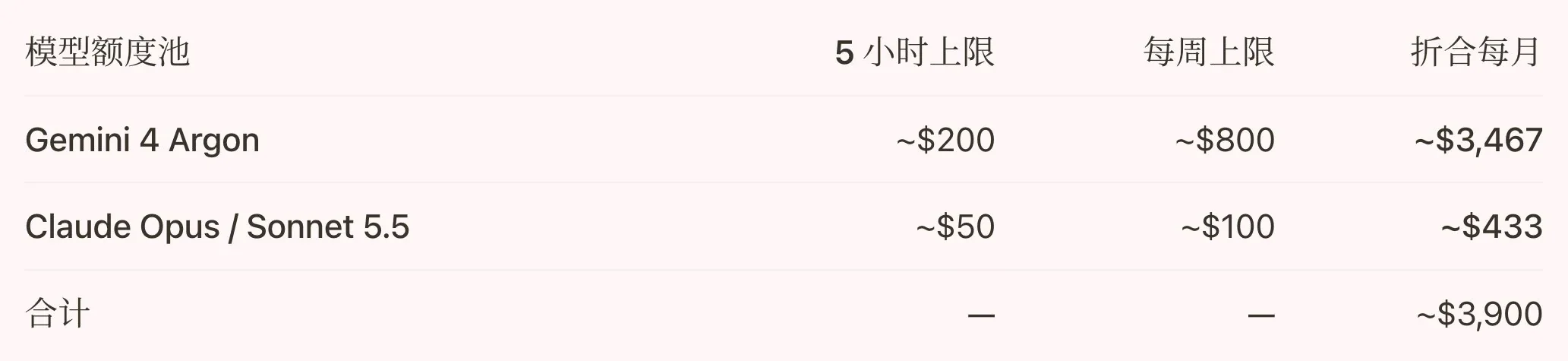
The question on every developer's mind is what kind of model bandwidth 400 RMB actually buys, particularly whether it comfortably covers coding powerhouses like Claude Opus 5.5 alongside Google's proprietary Gemini 4 Argon. According to quota allocation tables shared by Linux.do contributor yuwk, Google's flagship tier provides generous allowances, and the two primary model families draw from completely separate balance pools.
Gemini 4 Argon offers a rolling 5-hour limit of approximately 200 USD and a weekly ceiling of roughly 800 USD, translating to an estimated monthly value of 3,467 USD—an allocation that individual developers will find nearly impossible to deplete during standard software development. Meanwhile, Claude Opus 5.5 and Sonnet 5.5 share a dedicated, separate pool with a 5-hour cap around 50 USD and a weekly ceiling around 100 USD (~433 USD monthly). This volume slots in comfortably between Claude's official 20 USD Pro plan and 100 USD Max plan. As long as requests flow through standard official client interfaces rather than unauthorized public reverse proxies, using Opus will not eat into your Gemini quota, nor will it put your account at risk of suspension.
2. Three-Step Turkish iOS In-App Purchase Walkthrough
Account Prep and Apple Gift Cards
Before starting, you will need an iPhone or iPad (community reports confirm iPadOS works identically), a Turkish-region Apple ID, and a free Google account with no active subscriptions. Note that only your Apple ID needs to be set to Turkey, whereas your Google account itself can remain in the US or any other region without restriction.
When it comes to payment, do not waste time trying to bind domestic credit cards or non-Turkish bank cards, as commenters have spent hours hitting payment rejections due to strict BIN validation on the Turkish App Store. The cleanest approach is to buy a Turkish Apple Gift Card directly through Alipay or a reputable digital storefront and redeem it into your Apple account balance for seamless deduction.
Entering Through the Google Search App
This step is where most people trip up: the app you download from the App Store must be the core Google search app (the four-color G icon), never the Google One app and never the Gemini app. Tapping through Google One or Gemini will either kick you out to a mobile web browser or fail to trigger the native iOS in-app purchase sheet that exposes the hidden promotional pricing group.
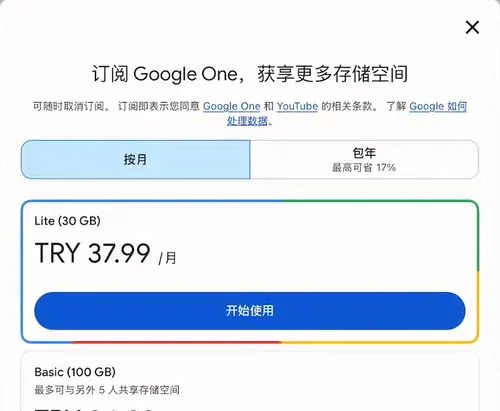
Open the Google search app, sign in with your clean Google account, tap your profile avatar in the upper right corner to enter Settings, and scroll to the bottom of the page to find and tap "Manage Google One." Because this is a free account, the 20X Ultra plan will not appear yet. Simply tap the cheapest Lite (30 GB) plan (billed at 37.99 TRY per month, equivalent to about 5 RMB), and complete the initial in-app purchase via the standard iOS confirmation sheet.
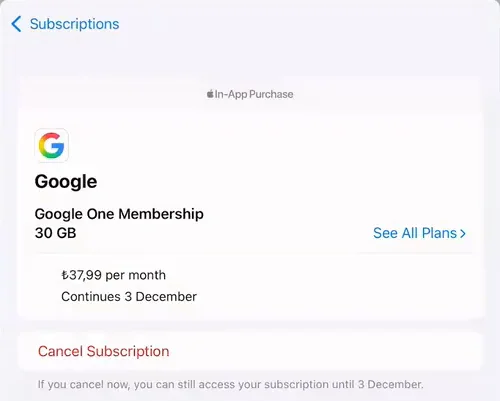
Upgrading Tiers in Apple Subscription Settings
Once that initial 5 RMB purchase unlocks your native in-app billing pipeline, close the Google app and go directly into iOS Settings -> Apple Account -> Subscriptions (or tap your profile avatar inside the App Store and select Subscriptions). You will now see an active item labeled Google - Google One Membership (30 GB). Tap into it, and you will spot the pivotal See All Plans option on the right.
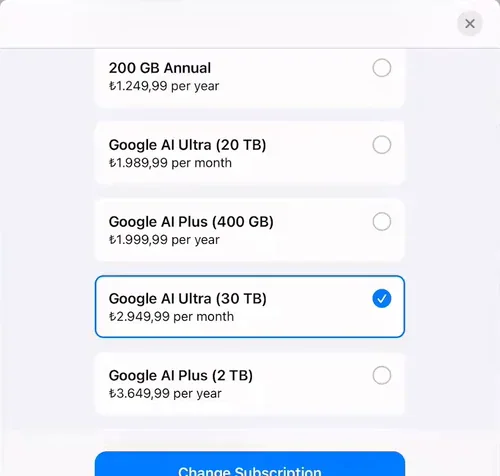
Tapping See All Plans opens Apple's internal catalog group titled intro offer group. Scroll down until you find ₺2.949,99 per month labeled as Google AI Ultra (30 TB). Select that tier and tap Change Subscription at the bottom to confirm. Once the upgrade charge succeeds, Apple automatically issues a prorated refund of your initial 37.99 TRY payment back to your Apple balance.
3. Common Pitfalls and Troubleshooting Tips
Picking the 30 TB Tier Over 20 TB
Scanning the comment sections on Bilibili and Linux.do, the most painful and frequent mistake is picking the wrong storage tier. Because Apple's subscription list only displays Google Drive storage capacity without explicitly labeling 5X or 20X quota multipliers, many buyers spot the cheaper Google AI Ultra (20 TB) ₺1.989,99 per month (~280 RMB) right above and tap it by mistake.
Make sure to verify the capacity before confirming: the 1,989.99 TRY 20 TB plan only grants 5X model quota, whereas the 2,949.99 TRY 30 TB plan is the true 20X flagship tier. Even if you previously subscribed to the 280 RMB 5X tier or accidentally tapped the 20 TB option, you can still open See All Plans inside your iOS subscription settings and pay the prorated difference to move up to the 30 TB plan.
Fixing Redirect Loops and Payment Holds
The second most common issue is seeing the Manage Plan button crash back to the home screen or open a web browser instead of the native App Store sheet. This almost always happens because your Google account still holds an active or lingering subscription from Gemini Web, Android Play billing, or the Indian Jio promotion, creating a cross-channel billing conflict that is easiest to solve by switching to a fresh Google account with zero subscription history.
If your account previously enrolled in the Indian Jio promotion and cannot normally cancel the subscription via Google One, you can directly visit Google's service deletion page at https://myaccount.google.com/deleteservices in a browser and manually delete data for Google One (labeled as AI One on some interfaces). Be extremely careful to delete only AI One / Google One data, and never remove core services like Gmail or YouTube. Keep in mind that manually deleting AI One subscription data terminates the existing plan permanently with no recovery possible; evaluate your remaining benefits carefully, or simply start fresh with a clean Google secondary account. Additionally, if you are subscribing primarily to drive code generation inside Google Antigravity, consider setting your Google account region to the United States or another supported region to bypass geographical restrictions on specific agent capabilities.
Other users reported that while the initial 37.99 TRY purchase went through smoothly, the second step charging 2,949.99 TRY triggered an App Store security prompt blocking the transaction. If that happens, do not spam the retry button repeatedly: verify that your Turkish Apple ID billing address is filled out completely, or contact Apple Support directly to confirm you are making a legitimate in-app subscription purchase so they can lift the payment hold on the backend.
4. Billing Safety and Rational Spending
Keeping Zero Balance Against Price Hikes
Some developers worry that this pricing might be a temporary configuration glitch that Google will claw back or penalize with account suspensions a few days later. From a platform architecture standpoint, you can rest easy: this is a legitimate App Store in-app purchase configured by Google inside Apple's intro offer group, and App Store rules strictly prohibit developers from revoking paid benefits mid-cycle.
The real uncertainty lies in whether your subscription will renew at 2,949.99 TRY next month, as several users have spotted the undiscounted standard price listed at 8,999 TRY on certain screens. The safest defensive move is to leave zero excess balance in your Turkish Apple ID after your upgrade clears: Apple always emails a renewal notice showing the exact upcoming charge ahead of the next billing cycle, letting you top up with another gift card if the promotional price holds or simply let it lapse if it reverts to full price.
Evaluating Real Coding Needs Over Perks
Before jumping in, it is worth taking a step back for a reality check: even a 70 percent discount from 1,340 RMB to 400 RMB still represents a recurring 400 RMB (~$56) monthly cash outlay. While the bundle throws in 30 TB of cloud storage, family sharing, and YouTube Premium, those add-ons hold minimal practical value for most engineers who will never come close to filling 30 TB of drive space.
The sole metric for determining whether to spend this 400 RMB is whether you have an intensive development workload over the coming month that demands sustained daily usage of Claude Opus 5.5 and Gemini 4 Argon. If you only write occasional scripts or query models for basic questions—never touching standard Pro quotas—there is no need to jump in simply because of a heavy headline discount. Only buy when genuine engineering throughput demands it.
Frequently Asked Questions (FAQ)
Q: Can I complete this process on an iPad without an iPhone, and do I need to migrate my primary Apple ID to Turkey? iPadOS handles the entire flow without issue, provided the device can log into the App Store. We strongly recommend creating a dedicated Turkish Apple ID strictly for Media & Purchases in the App Store rather than altering the region of your primary iCloud account.
Q: Does invoking Claude Opus 5.5 in Google Antigravity deduct from the Gemini 4 Argon quota pool?
No, the two pools do not compete with or deplete each other.
Community testing confirms that Opus 5.5 and Sonnet 5.5 share an independent weekly pool worth roughly 100 USD, whereas Gemini 4 Argon enjoys an isolated weekly allocation of roughly 800 USD.
Q: Can I add five family members to split costs or host the account as a shared reverse proxy on a server? Family sharing works normally for standard ecosystem perks like the 30 TB cloud storage. However, exposing the account via a public reverse proxy for shared token distribution is strongly discouraged. Google actively monitors anomalous concurrency and reverse proxy patterns, and the risk of account suspension far outweighs the savings. Direct official client usage remains the only safe path.
Q: Why does my subscription screen display 8,999 TRY instead of 2,949.99 TRY?
The 2,949.99 TRY rate belongs to Apple's intro offer group (introductory promotional tier).
If your Apple ID or Google account has previously consumed an introductory offer within this group, iOS displays the standard undiscounted price. Switching to a clean Google account paired with an unassociated Turkish Apple ID will reveal the discounted rate.