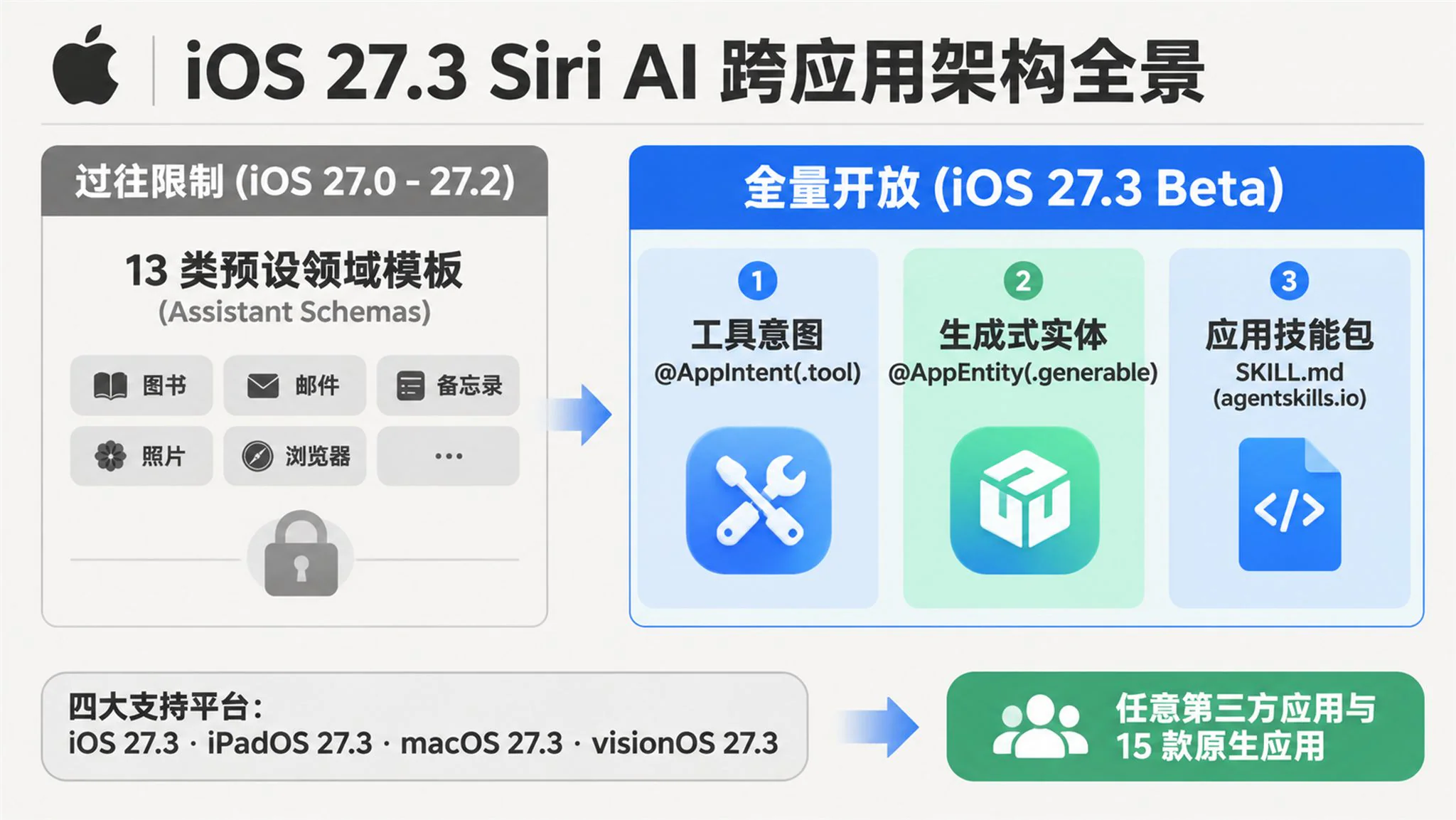
On November 3, 2026, Apple shipped the first developer betas of iOS 27.3, iPadOS 27.3, macOS 27.3, and visionOS 27.3, formally opening the Siri AI Developer Preview to all third-party developers. The release removes the restriction that previously forced third-party apps to fit into 13 predefined domain templates (Assistant Schemas), allowing any vertical application to expose custom actions and content directly to Siri AI.
To help system-level language models navigate complex domain logic, Apple expanded the App Intents framework with the @AppIntent(.tool) macro, the @AppEntity(.generable) macro, and App Skills (SKILL.md bundles) built on a subset of the open agentskills.io specification. Paired with the Siri Evaluations testing framework across five assertion dimensions, the preview gives developers several months to build and validate integrations before initial customer delivery in a few months and App Store submissions in Spring 2027.
1. Breaking the Thirteen Schema Barrier
The Predefined Schema Bottleneck
During the iOS 27.0 through iOS 27.2 cycle between September and October 2026, Apple launched its rebuilt Siri AI architecture but kept third-party developers behind a strict boundary. Any app seeking Siri AI integration had to conform its intents strictly to one of 13 predefined Assistant Schemas.
Those 13 domains covered only books (.books), browsers (.browser), cameras (.camera), file management (.files), journaling (.journal), mail (.mail), messaging (.messages), notes (.notes), photos and video (.photos), presentations (.presentations), spreadsheets (.spreadsheets), system state (.system), and word processors (.wordProcessor). Everyday vertical services — including food delivery tracking, rideshare dispatching, restaurant table booking, e-commerce returns, flight status lookup, and retail banking — were locked out simply because their workflows did not fit those 13 molds.
The 27.3 Beta 1 release tears down that wall without requiring developers to request a new system entitlement or apply for a separate developer program. By adapting existing App Intents code, any third-party app can now register custom actions with Siri AI and donate arbitrary custom entities to the Spotlight Semantic Index.
Tool Intents and Generable Entities
To turn standard app actions into callable tools for the underlying language model, Apple introduced the ToolIntent protocol and the @AppIntent(.tool) macro in the AppIntents framework. Developers simply annotate a custom intent struct with @AppIntent(.tool) so Siri AI can dynamically discover and invoke it during a conversation.
If an existing intent already conforms to a Shortcuts-only schema — such as creating a journal entry (.journal.createEntry) or opening a book (.books.openBook) — developers can combine both declarations as @AppIntent(.tool, schema: .journal.createEntry). That hybrid declaration preserves existing Shortcuts template benefits while unlocking Siri AI invocation, whereas attaching .tool to an intent that already conforms to a Siri-supported schema (like .messages.sendMessage) triggers an immediate compile-time build error in Xcode 27.3.
For workflows that extract multiple structured filter parameters from a single natural language sentence rather than querying pre-existing database records, Apple added the GenerableEntity protocol (inheriting from TransientAppEntity) and the @AppEntity(.generable) macro. Using Apple's FlightSearch example, annotating properties with @Property natural language descriptions lets Siri AI bypass a preliminary entity query and instantiate the parameter struct directly from spoken input.
import AppIntents

@AppEntity(.generable)
struct FlightSearch: TransientAppEntity {
    static let typeDisplayRepresentation: TypeDisplayRepresentation = "Flight Search"

    @Property(description: "3-letter IATA airport code for departure")
    var origin: String

    @Property(description: "3-letter IATA airport code for destination")
    var destination: String

    @Property(description: "Departure date and time")
    var date: Date

    @Property(description: "Cabin class such as economy, business, or first")
    var cabin: String

    var displayRepresentation: DisplayRepresentation {
        DisplayRepresentation(title: "\(origin) to \(destination)")
    }
}

@AppIntent(.tool)
struct SearchFlightsIntent: ToolIntent {
    static let title: LocalizedStringResource = "Search Flights"

    @Parameter(title: "Search Criteria")
    var criteria: FlightSearch

    func perform() async throws -> some IntentResult & ReturnsValue<[FlightEntity]> {
        let flights = try await FlightService.shared.search(criteria)
        return .result(value: flights)
    }
}
When a user says "Find business class flights from San Francisco to JFK next Friday," Siri AI's language model resolves "San Francisco" and "JFK" into the three-letter IATA codes SFO and JFK, converts the relative date into a concrete timestamp, and populates a FlightSearch instance to pass into SearchFlightsIntent.
Supported Platforms and Build Matrix
Although Apple seeded 27.3 Beta 1 across all six operating systems on November 3, 2026, the third-party Siri AI Developer Preview is supported on four platforms running on Apple Intelligence-compatible hardware. Those four targets are iOS 27.3 Beta (build 24C5037i), iPadOS 27.3 Beta (24C5037i), macOS 27.3 Beta codenamed Golden Gate (26C5035r), and visionOS 27.3 Beta (24N5286r).
While watchOS 27.3 Beta 1 (24S5284h) enables first-party Audio Intelligence features (Siri Recap and Live Rewind) on Apple Watch Series 12 and Ultra 4, third-party ToolIntent, GenerableEntity, and evaluation APIs are not available on watchOS or tvOS (24K5286g). Building these integrations requires Xcode 27.3 Beta with Swift 6.4 and the 27.3 SDKs, running on a Mac with macOS Tahoe 26.6 or later.
2. Orchestrating Actions with App Skills
Two-Stage Loading via Open Standards
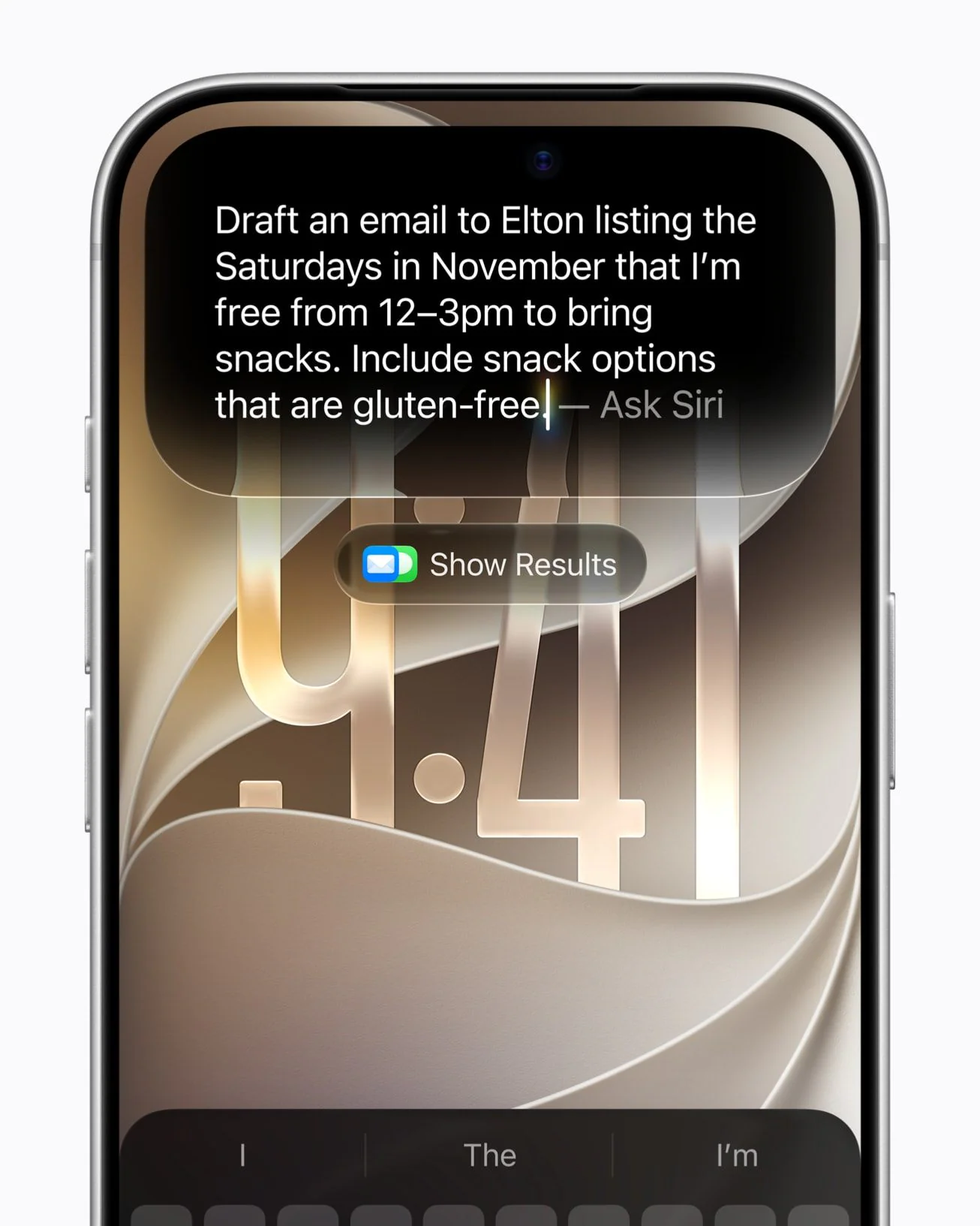
Once an application exposes a dozen or more tool intents to Siri AI, isolated function signatures alone rarely give the language model enough context to determine execution order or parameter gathering rules. Apple addressed this by introducing App Skills, which guide Siri AI in chaining multiple tool intents into composite workflows, disambiguating similar intents with different preconditions, injecting domain-specific rules, and conducting multi-turn follow-up questions with the user.
Rather than inventing a proprietary configuration format, Apple's official documentation specifies that App Skills adopt a subset of the open Agent Skills specification (https://agentskills.io/specification). In Xcode 27.3, choosing File > New > File from Template and selecting Skills Bundle under the Resource section generates a Skills.skillsbundle directory containing Skills.skillsbundle/Skills/<skill-name>/SKILL.md.
Each app target can include at most one Skills.skillsbundle, and Siri AI parses only the name and description YAML frontmatter fields plus the Markdown body, omitting support for additional frontmatter keys, scripts, or reference files. To keep context window overhead low across dozens of installed apps, Apple enforces a strict two-stage on-demand loading pipeline and character limits for every SKILL.md file.
- Skill Identifier (
name) — Required, 1 to 64 characters using only lowercase letters (a-z), digits (0-9), and hyphens (-), with no leading, trailing, or consecutive hyphens (--), matching the parent folder name and remaining globally unique across the app, app extensions, and embedded frameworks. - Stage-One Triage (
description) — Required, a single line of plain text up to 1,024 characters. When a request arrives, Siri AI reads only thedescriptionfield first to decide whether the skill applies, meaning all trigger conditions and domain boundaries must be stated in this single line. - Stage-Two Context Injection (Markdown Body) — Up to 10,000 characters. Only after Siri AI matches a skill via its
descriptiondoes the system load the Markdown body into the model context to read the intent orchestration steps and conversational guidance.
---
name: order-return-assistant
description: Handle customer requests to return delivered items, check return window eligibility within 30 days, and generate return shipping labels.
---

# Order Return Workflow

Use this skill when a person asks to return an item or exchange a recent purchase.

## Step 1 - Verify Eligibility
Before creating a return order, call `CheckReturnEligibilityIntent` with the target `OrderEntity`.
Only proceed if `isDelivered` is true and the delivery date is within 30 days.

## Step 2 - Collect Return Reason and Method
Ask the person why they are returning the item and whether they prefer a drop-off QR code or a printable label.

## Step 3 - Submit Return
Call `CreateReturnOrderIntent` with the verified order, reason, and preferred return method.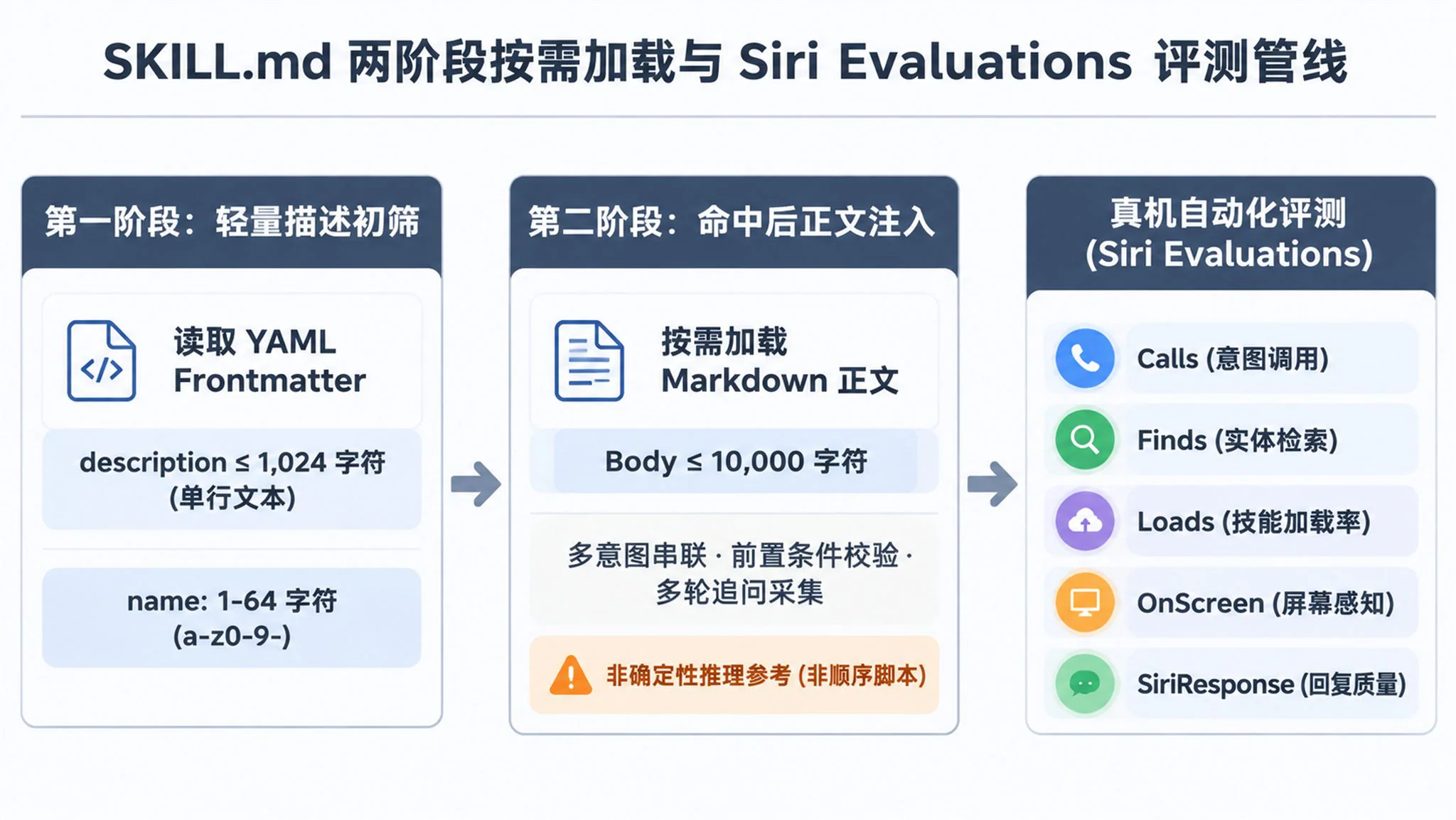
Non-Deterministic Limits and Atomic Design
Developers encountering SKILL.md for the first time often mistake it for an imperative procedural script, prompting Apple to place an explicit warning callout in the documentation. Apple states verbatim — "You can’t use app skills to enforce deterministic behavior. Siri AI uses your app skills to inform its behavior, and doesn’t sequentially perform the tool intents that your skill lists."
Because SKILL.md serves as soft contextual guidance for language model reasoning, Siri AI may skip a listed step or reorder tool calls depending on conversational state. Whenever business logic requires two operations to execute in a guaranteed atomic sequence — such as verifying return eligibility before issuing a shipping label, or deducting loyalty points alongside a coupon grant — developers must combine that logic in Swift inside a single ToolIntent's perform() method rather than splitting it across multiple intents in SKILL.md.
On-Device Evaluation and Five Assertions
Testing non-deterministic LLM agent workflows with traditional unit tests is notoriously brittle, so Apple introduced the Siri Evaluations framework alongside Xcode 27.3's static Siri Integration Advisor. While Siri Integration Advisor scans App Intents code at edit time for missing descriptions or schema conflicts, Siri Evaluations lets developers write multi-turn SiriScenario scripts with UserTurn inputs inside Swift Testing suites.
Using SiriService and SiriExpectationEvaluator, test suites dispatch scripted conversations through the live Siri pipeline and evaluate quantitative assertions across five core dimensions.
Calls— Verifies that Siri invoked the expectedAppIntentduring the corresponding conversational turn.Finds— Checks whether Siri retrieved and surfaced the expectedAppEntityinstances to the user.Loads— UsesSkillDefinition(name:)to verify whether Siri matched and loaded a specificSKILL.mdbundle, supporting.required(fails the test if unloaded) and.preferredenforcement levels while reportingskillsLoadedPassandskillsLoadedAllPassmetrics.OnScreen— Injects simulated onscreen context to test onscreen awareness routing without manual UI setup.SiriResponse— Evaluates the quality and accuracy of Siri's final natural language response.
Apple explicitly notes that App Skills and Siri AI preview integrations cannot be tested in Simulator, requiring deployment to physical devices equipped with Apple Silicon or A17 Pro and later chips. Furthermore, third-party Siri AI integrations currently function only in Xcode development-signed builds and internal TestFlight builds, remaining disabled at the system level for external TestFlight testers and App Store releases until Spring 2027.
3. Implicit Context and Cross-App Flow
Three Implicit App Routing Contexts
In earlier generations of Siri, invoking a third-party app almost always required speaking the exact application name out loud in every command. In 27.3 Beta, Apple linked system state directly to the intent router, allowing users to omit the app name entirely when any of three implicit context conditions holds true.
- Foreground App Context — When the user is actively viewing a third-party app on screen, speaking a filter, bookmark, or checkout command routes directly to that foreground app via
NSUserActivityand Onscreen Awareness. - Active Live Activity Context — When a third-party app has an active
Live Activityon the Lock Screen or Dynamic Island, commands route automatically to that app, such as saying "Hey Siri, change my ride pickup to [address]" while a rideshareLive Activityis running. - Continuing a Siri App Thread — Within the dedicated
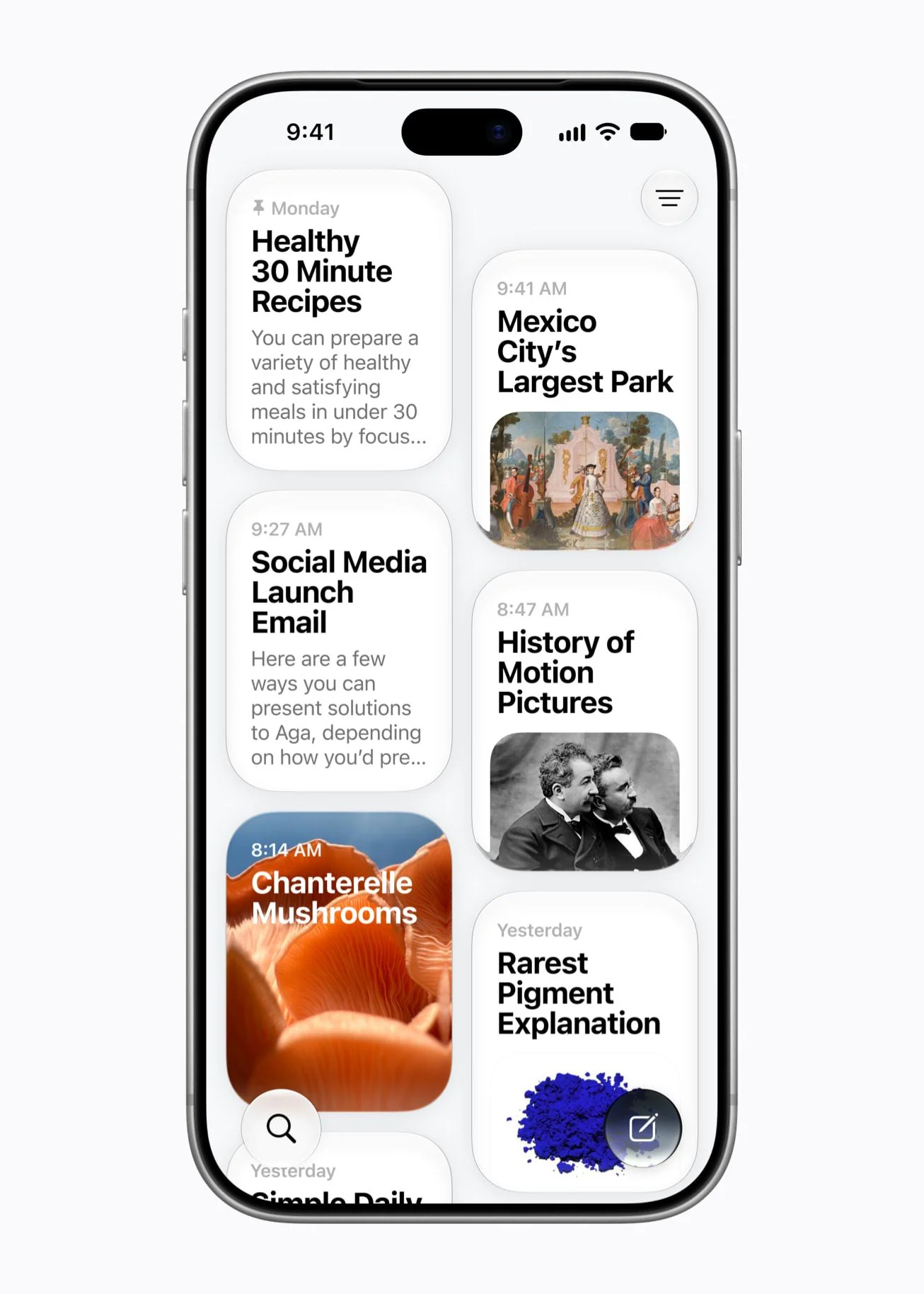
Siri appintroduced in iOS 27, which syncs two-column conversational history cards across devices via iCloud, any follow-up turn in a thread that previously mentioned a third-party app automatically retains that app context.
Cross-App Transfer and Privacy Gates
Beyond single-app workflows, 27.3 Beta allows any AppEntity conforming to the Transferable protocol (from CoreTransferable) to flow directly from one third-party app into another. In Apple's canonical multi-hop example — "Hey Siri, send my favorite sneakers to my partner in [messaging app]" — Siri AI queries the shopping app for the bookmarked sneaker entity, resolves "my partner" via personal context, and passes the transferable payload into the specified messaging app.
Because cross-app data extraction raises immediate lock-screen privacy concerns for banking and enterprise developers, Apple built two fine-grained security controls into the entity layer.
- Property-Level Internal Visibility (
IntentVisibility.internal) — If an entity contains sensitive fields meant only for internal app logic or widgets (such as a bankroutingNumberinsideBankAccountEntity), annotating it with@Property(visibility: .internal)hides that property completely from Siri and Shortcuts while leaving the account nickname and balance accessible. - Three-Tier Authentication Policy (
IntentAuthenticationPolicy) — Developers can apply.alwaysAllowed,.requiresAuthentication(device unlocked), or.requiresLocalDeviceAuthentication(biometric or passcode verification) across an entire entity or on individual@Property,@DeferredProperty, and@ComputedPropertydeclarations.
However, the 27.3 Beta 1 release notes reveal two notable known issues that security-conscious teams must track closely. On iOS and iPadOS 27.3 Beta 1, bug 190573761 warns that Siri AI might not request a device unlock before displaying entities or entity properties configured to require unlocking, while on macOS 27.3 Beta 1, bug 191273925 prevents Siri from finding Spotlight-donated third-party entities unless they conform to a predefined schema.
Fifteen Upgraded First-Party Apple Apps
To demonstrate what the expanded architecture can do in production, Apple simultaneously upgraded 15 first-party apps in iOS 27.3, iPadOS 27.3, and macOS 27.3 Beta 1 with deeper Siri AI actions. The 15 apps are Calendar, Files, Finder, Journal, Mail, Maps, Messages, Music, Notes, Photos, Preview, Reminders, Safari, Shortcuts, and Weather.
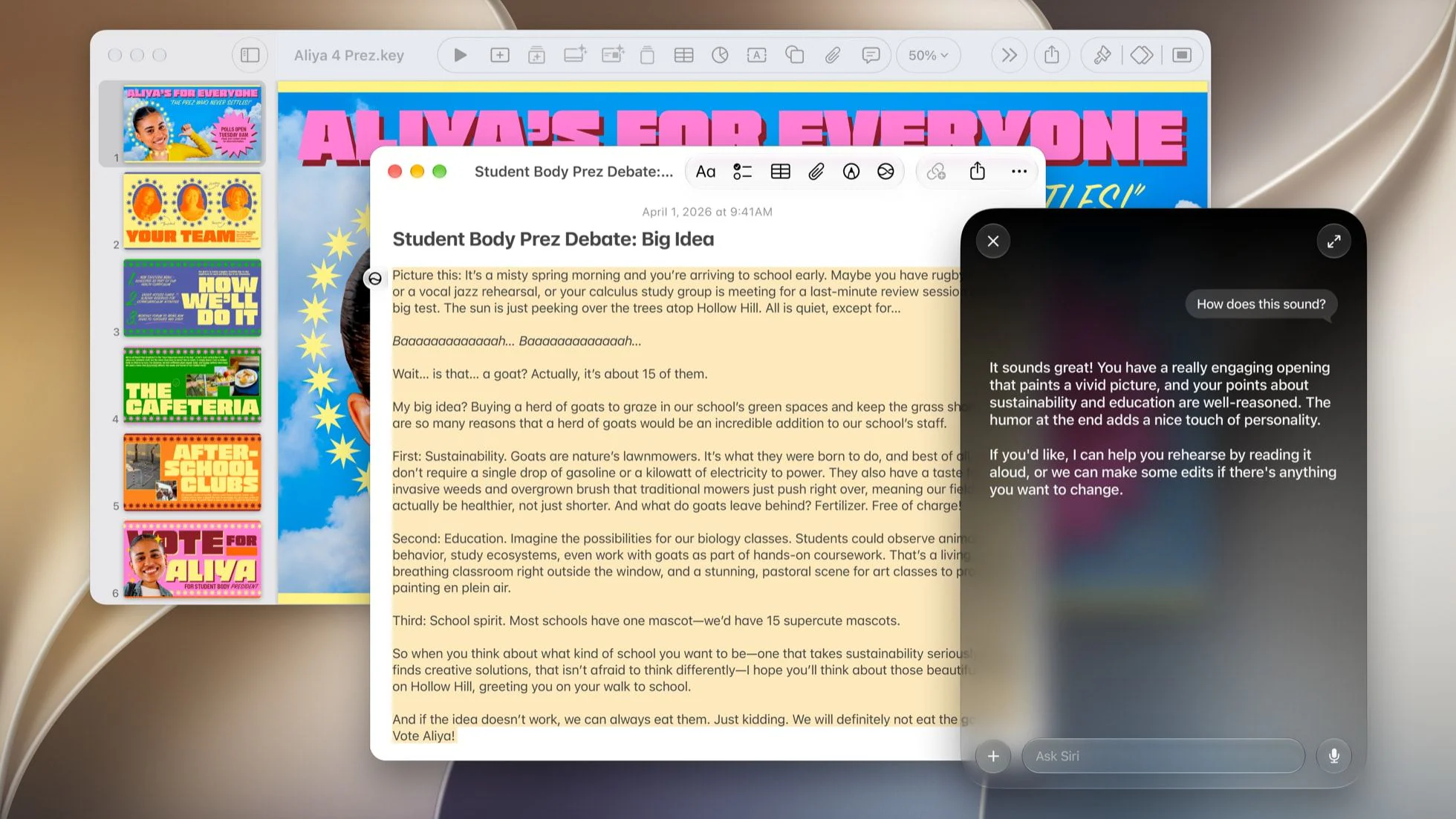
Across these built-in apps, users can now trigger composite operations that previously required navigating deep nested menus by hand.
- Files and Finder — Archive files or move documents unopened for over a year to the Trash, automatically sort folders by file type, batch-rename items, and extract text content directly via voice or typed prompts.
- Messages and Mail — Schedule iMessages for future delivery, edit or unsend recent messages, and send emoji Tapbacks in Messages, or unsubscribe from marketing mailing lists and undo recently sent emails in Mail.
- Safari, Photos, Journal, and Reminders — Group URLs into Safari Tab Groups and close duplicate tabs, rotate photos and rename people or pets in Photos, record audio or transcribed entries in Journal, and create Urgent Reminders for the first time via Siri.
4. Cloud Quotas and Three-Track Reality
Daily Limits and Paid Capacity Tiers
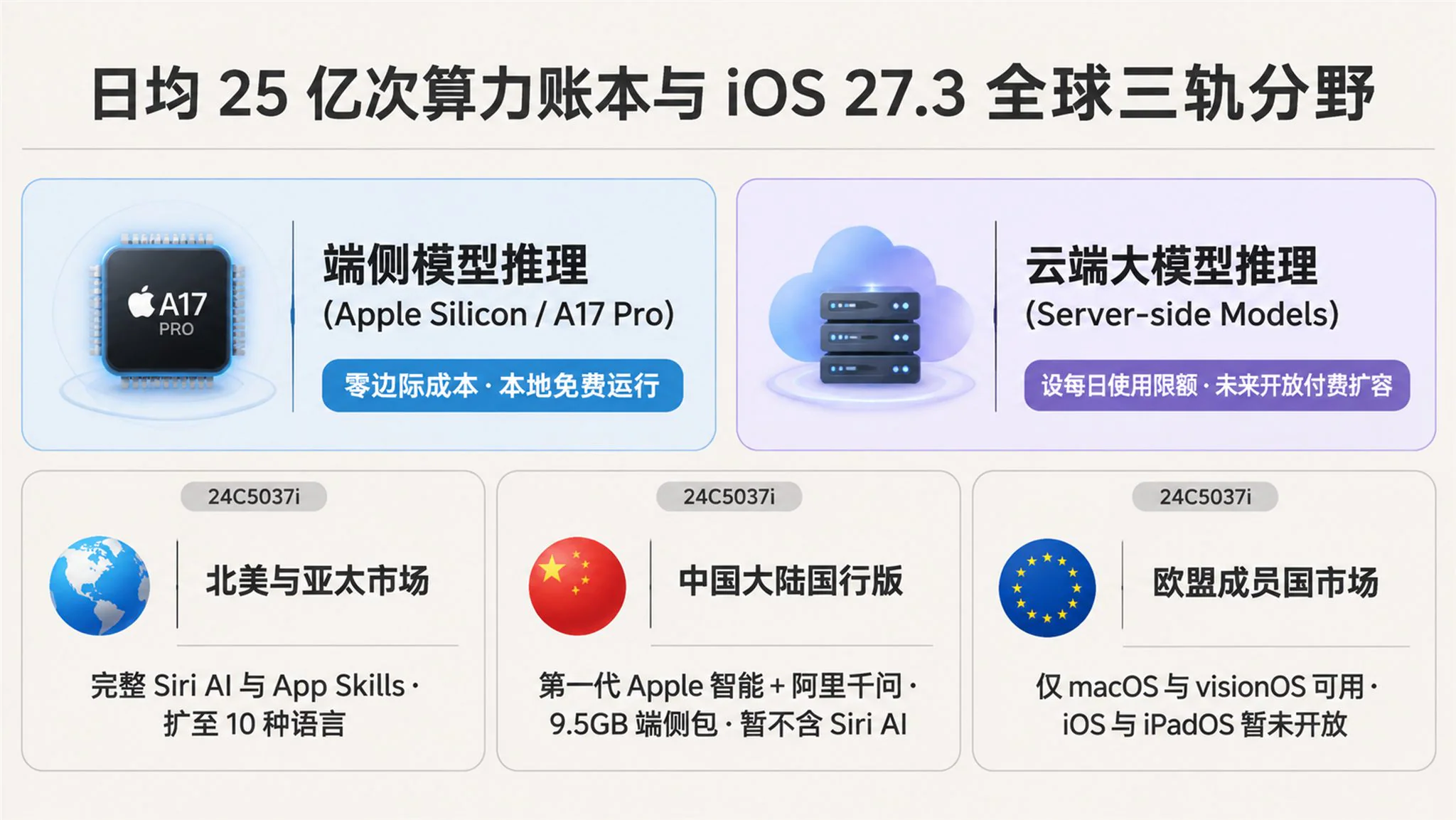
When 15 system apps and millions of third-party apps begin chaining multi-step LLM tool calls, server-side inference consumption scales rapidly. During Apple's fiscal Q4 2026 earnings call on November 2, 2026 — where Apple reported $114.5 billion in quarterly revenue, up 12% year-over-year — new CEO John Ternus revealed that Siri already handles more than 2.5 billion requests a day.
On the same call, CFO Kevan Parekh noted that while on-device inference carries virtually zero marginal cost, server-side inference incurs real compute expenses booked under services cost of sales, contributing to Apple's December-quarter gross margin guidance of 45% to 46%. Consequently, both the November 3 developer announcement footnote and Apple Support document HT148587 formally establish daily usage limits and future paid capacity tiers for server-backed features.
Under those terms, Apple Intelligence features relying on server-side models are subject to daily usage caps, covering Siri AI, intelligent photo editing tools (Clean Up, Extend, and Spatial Reframing), Image Playground, AFM 3 Cloud and AFM 3 Cloud Pro models in Shortcuts, and third-party apps invoking Private Cloud Compute foundation models. Addressing the caps, Ternus stated — "Anyone who needs greater capacity will be able to purchase expanded access in the future." Apple's developer bulletin similarly confirmed — "Expanded access to such features will be available for a fee in the future."
One Firmware and Three Regional Tracks
On the localization front, Siri AI launched in English with iOS 27.0 in September 2026, added French, Japanese, Korean, Portuguese, and Spanish in iOS 27.2 on October 26, and is expanding in the 27.3 Beta cycle to support Traditional Chinese, Norwegian, Turkish, and Vietnamese (bringing the total to 10 languages, though German and Simplified Chinese remain absent). More importantly for cross-border engineering teams, the exact same iOS 27.3 Beta 1 firmware (build 24C5037i) operates along three distinct regional tracks worldwide.
| Dimension | Supported Global Markets (US, APAC, etc.) | Mainland China Market (China SKU) | European Union Member States |
|---|---|---|---|
| AI Generation | Next-gen iOS 27 Siri AI & Apple Intelligence | First-gen Apple Intelligence & legacy Siri | Siri AI blocked on mobile devices |
| Cloud Partner Stack | Apple cloud models + Google Gemini stack | Alibaba Tongyi Qwen foundation models | Apple cloud models on Mac / Vision Pro only |
| Custom App Skills | Full @AppIntent(.tool) & SKILL.md support |
Unsupported (no Siri AI or App Skills) |
Supported on macOS 27.3 & visionOS 27.3 only |
| Dedicated Siri App | Includes two-column Siri app with iCloud sync |
Excluded (no standalone Siri app) |
Unavailable on iOS, iPadOS, and watchOS |
| Hardware & Storage | All Apple Intelligence compatible devices | China iPhone 15 Pro+, ~9.5 GB model download | EU Mac and Apple Vision Pro hardware only |
Following the regulatory approval of Apple and Alibaba's partnership announced on October 31, 2026, mainland China devices (requiring a China-mainland iPhone 15 Pro or later, region set to China mainland, a mainland Apple ID, and roughly 9.5 GB of on-device model downloads with 15 GB of free space recommended) began testing "Apple Intelligence and Siri" in iOS 27.3 Beta 1 ahead of a December public rollout. However, hands-on verification confirms that mainland China is receiving the first-generation Apple Intelligence feature set aligned with overseas iOS 18.1 through iOS 26 (Writing Tools, Clean Up, live translation, notification summaries, and legacy Siri wired to Alibaba's Qwen), excluding the Gemini-backed iOS 27 Siri AI architecture, the standalone Siri app, and cross-app App Skills.
Roadmap for Third-Party Engineering Teams
Between the November 3, 2026 developer preview launch, initial customer delivery in a few months, and the opening of App Store submissions in Spring 2027, engineering teams have a four-to-five-month window to prepare their integrations. Teams building for the global Apple ecosystem should prioritize three concrete engineering steps.
- Migrate High-Value Long-Tail Actions to
@AppIntent(.tool)— Audit domain actions that were previously blocked by the 13 schema limit, adopt@AppEntity(.generable)to streamline multi-parameter natural language extraction, and consolidate state-mutating or financial steps inside a singleperform()body to guarantee atomicity. - Optimize the 1,024-Character
SKILL.mdDescription on Real Hardware — Because Siri AI's stage-one loader inspects only thedescriptionfield before deciding whether to inject the Markdown body, craft crisp action verbs and trigger boundaries, then benchmarkskillsLoadedPassusingSiri Evaluationson physical Apple Silicon or A17 Pro+ test devices. - Implement Regional Feature Flags and Quota Fallbacks — Apps shipping in both overseas markets and mainland China must branch their voice integration paths between iOS 27.3
App Skillsand classic Shortcuts, while ensuring graceful local UI fallbacks when heavy users hit daily server-side inference limits.
Frequently Asked Questions
Q: When can third-party developers ship @AppIntent(.tool) and App Skills integrations to production App Store users?
Third-party Siri AI integrations currently run only in local Xcode development-signed builds and internal TestFlight builds, remaining disabled for external TestFlight testers and App Store releases. Apple plans to ship initial support to end users in a few months and open App Store submissions in Spring 2027.
Q: Does the mainland China "Apple Intelligence and Siri" rollout in iOS 27.3 Beta 1 support custom App Skills?
No, the mainland China rollout in iOS 27.3 Beta 1 delivers the first-generation Apple Intelligence feature set (Writing Tools, Clean Up, notification summaries, and legacy Siri) powered by Alibaba's Qwen model. The rebuilt iOS 27 Siri AI, standalone Siri app, and third-party App Skills rely on Google Gemini cloud infrastructure and are not included in the mainland China build.
Q: Can we run SKILL.md app skills and Siri Evaluations test suites inside the Xcode iOS Simulator?
No, Apple's developer documentation explicitly states that app skills and the Siri AI Developer Preview are not supported in Simulator. Developers must deploy and run their apps and Siri Evaluations test suites on physical devices supporting Apple Intelligence (Apple Silicon or A17 Pro and later).
Q: Can we use SKILL.md to force Siri AI to execute multiple tool intents in a strict 1-2-3 deterministic order?
No, SKILL.md only provides contextual guidance to inform the language model's reasoning, and Siri AI will not mechanically execute listed tool intents in sequence. Any operations that must run in a strict atomic order should be combined in Swift code inside a single ToolIntent's perform() method.
References and Sources
- Apple Developer News — Siri AI is now open to all developers (2026-11-03)
- Apple Developer Documentation — Siri AI Developer Preview (2026-11-03)
- Apple Developer Documentation — Bringing custom actions and content to Siri (2026-11-03)
- Apple Developer Documentation — Orchestrating complex actions with app skills (2026-11-03)
- Apple Developer Documentation — ToolIntent & GenerableEntity API Reference (2026-11-03)
- Apple Developer Documentation — Siri Evaluations Framework & Loads Expectation (2026-11-03)
- Apple Developer Documentation — iOS & iPadOS 27.3 Beta Release Notes (2026-11-03)
- Apple Developer Documentation — macOS 27.3 Beta & Xcode 27.3 Beta Release Notes (2026-11-03)
- Apple Newsroom — Siri AI, a profoundly more capable and personal assistant, is here (2026-09-14)
- Apple Support — Apple Intelligence Usage Terms HT148587 (2026-09-09)
- 9to5Mac — Developers can now create advanced 'app skills' for Siri AI (2026-11-03)
- MacRumors — iOS 27.3 Beta Brings Apple Intelligence to China (2026-11-03)
- TechRadar — Apple confirms plans to charge for expanded Siri AI access (2026-11-03)
- ShiftDelete.Net — Siri AI Usage Limits Coming as Apple Plans Paid Access (2026-11-03)